Tuesday, December 20, 2016

The Power of a Single Metric

One number can't tell you everything, but it can tell you some things. For the past two years I have used the connected smart scale to take daily weight measurements in an effort to watch, and lower, my weight.

Let's start with a caveat. One number does not tell you how healthy you are. Your weight does not tell you your whole fitness story. If I had to measure my fitness, I would do it like this: I'm on vacation, I get up at dawn, go for a ten mile hike through the beautiful desert, back to the hotel, hang out at the pool, then back out for sunset. If I'm healthy, I can do all this and more and really get my money's worth. If I'm not fit, I won't be able to do half of that. If I get tired and need a nap, that's valuable vacation time wasted. So my level of fitness has a direct correlation to quality of life. The fitter I am, the more adventures I can have!

Now to the single measurement and what it can do by telling the story of my first year with the scale. At the beginning of 2015 I decided to weigh myself every day the first thing in morning. It's the least I weigh all day, so it's a bit more encouraging than weighing myself, say, after eating lunch. So it's a life-affirming baseline. Also, it tells me something about my day. If I'm below my weight goal, I can enjoy happy hour after work. If I'm above, I'd better have vegetables instead, and maybe go for an extra long walk or run in the evening. In this way I was able to watch my weight and slowly bring it down. Slowly. Losing weight quickly increases the risk of gaining it back. The body has all kinds of ways to compensate for what it sees as a loss of energy stores. It will slow your metabolism if it thinks you're starving. So I don't want to deprive myself, I don't want to go hungry long enough for the body's defenses to kick in. I wanted to drop weight, but I also want my body to see my lower weight as the "new normal."

According to my chart, my highest measured weight was 186lbs. My goal was to drop this down to 165 over the course of a year, hold that weight for a year, and then drop another 5lbs. That would take me from my pub food and beer weight down to what I weighed when I was running marathons. I wanted to go from this:

To this:


So here is a graph of my first year using a smart scale. Spoiler alert: it worked, as you can see.

You can see the peak is over 186.5lbs in February.
 My first reading under 165 was on December 30th. Just in time for the end of the year. My goal for 2015!

This gave me a sense of elation, letting me celebrate reaching my goal at the end of the year. I lost twenty pounds, right? Well, not exactly. Individual readings vary, and if we look at the 2-week moving average:


The moving average is a better measure of weight as it evens out day-to-day variations. Now we see that my starting weight was closer to 182and I didn't hit 165 until mid-February and I was able to keep the moving average around 165 for the rest of the year.

You might notice a significant drop in June. What's happened? This happened.

A friend had the brilliant idea to climb Mt Kilimanjaro and a funny thing happened there. Altitude is a terrific appetite suppressant, dangerously so in fact. We would hike all day and find ourselves not hungry at dinner. This can be a problem, so we had to force ourselves to eat despite not feeling hunger. Being unable to judge how much my body needed, I would place the amount of food on my plate that I thought I would need, visually estimating my calorie requirements, and then force myself to eat it all.

While we were all sitting around the dinner table shocked at our lack of hunger, I joked that when we got back I would write a new fad diet book, "The High Altitude Weight Loss Diet" and companion exercise book, "Eleven Hour Abs." Indeed, when we were done we were all visibly thinner, and the graph of my weight has a noticeable drop.
And the moving average...
So there was a real difference. I went from very slow progress to a sudden drop which seemed to kick off a period of further steady progress. You might also notice that progress continued after the climb. I resolved to hold on to that weight loss so I did two things. One, the inverse of mountain eating, I would visually estimate the amount of food I needed on my plate, and then force myself to eat no more than that. Two, I walked a lot more and tried to stay active. I joined a second run club and reminded myself that I'm still not walking as much as we did on the mountain. I kept up this attitude for the rest of the year, weighing myself every morning, and watched and celebrated my progress.

What did I learn? A few things:

  1. To maintain a healthy weight, I need to be hungry a few hours a day. Typically an hour before lunch and 2-3 hours before dinner. To keep from feeling deprived, I would remind myself how much better that meal will taste now that I'm hungry.
  2. It's better to estimate how much I need to eat before I start eating, and this usually means I'm still a little hungry when I stop eating. About 20 minutes after I stop eating I will stop being hungry. This is very different from the old me, who would only stop eating after I got that satiated feeling. 
  3. Taking many short walks throughout the day is better than a few intense exercise sessions per week. Perhaps it keeps my metabolism elevated, but whatever the physiological mechanism, daily weight measurements showed the difference. 
  4. Don't be afraid of the scale! Healthy weight only happens when you measure it. Being afraid of what you see on the scale only increases the risk of weight gain. Be brave every morning, step on that scale with open eyes, and more often than not, you will see pleasant surprises.
  5. Daily readings make daily plans.
Moving averages, daily plans based on daily readings, and refine-as-you go approaches are tools that helped me reach my goals. As I inevitably get older I plan to apply these tools to other biometric readings as needed to live a long and healthy life. And I hope you can too! 


Thursday, February 12, 2015

How to Win a Hackathon (also: free beer)

You can spend an entire weekend in San Francisco and not pay for food or drinks once. All you need to do is build a prototype web application in 5 minutes and spend the next 50 hours making it into something never seen before. The hackathon is here.

Hackathon is the local sport. It's an endurance event for programmers and builders, usually an entire weekend where the contestants race from zero to working application, followed by Olympic-style judging (the criteria might be creativity, applicability to the problem set (usually there is always a "theme"), and technical difficulty). It's a team sport, and if you want to win you have to bring something good to your team. There's a few things you can do that will make your team happy and give you a shot at the gold medal.

First, preparation is essential. You build your laptop from scratch to be the ultimate developer machine, with several full development stacks and your code editor customized just the way you like it so anything you might need is at your fingertips. Then you'll spend at least a day or two in last minute preparation and testing; doing some practice exercises could't hurt. The key to a good hackathon is rapid prototyping, and that requires tools and skills already in place and ready to go.

What You Need to Bring

At some point I had to ask myself, what is in my toolbox? What do I install on my laptop and how do I make sure I don't embarrass myself by not having the latest SuperNextGen Build System configured to auto-construct the web site we need and remember everyone's coffee order? Also, I want to win! And to win I need the absolute best tools in the room, configured just so. And so what tools do you bring?

Web services development and hosting

That's right, bring the cloud. More precisely, your access to cloud servers and services. You should be able to whip up a new web service as fast as you can type, and deploy it somewhere the rest of your team can use it. At minimum you need a good REST CRUD for basic object persistence; in reality everyone will be expecting you have the entire data set in a high-throughput BigQuery analysis engine by lunch time. In a pinch, JPA on AppEngine will do.

Whatever platform you use, you're going to want to get a test system up and running first thing, something that you can build your application on. This first program essentially becomes a workbench, something you can test on, adding and removing new features to see how they work. Start with something generic, then specialize it to your problem set.

Oh, and you'll need to be able to share your code and other digital assets. Here, a little setup beforehand goes a long way.

User Interface Experience.

It's not an interface, it's an experience. There's rapid prototyping and then there's interactivity, and you'll never know what kind of interaction works until you try it. You need your code templates and a toolbox of plug-and-play components ready to go, organized so you find the right one quickly. Yes, you can impress everyone with a little copy and paste and some quick JavaScript.

Data Visualization 

Chances are, whatever you build will involve looking at data. With a visualization library like D3, you can design and deploy a number of different charts for whatever is thrown at you the day of the hack. 

Hardware

Nobody hacks in pure software. Not in the age of Raspberry Pi and homebrew sensors. If you show up with a programmable hardware device and it turns out to be actually useful, you will be the rock star.

Algorithms

You should just learn all you can, constantly. Bring what you know.

Monty Python Jokes

You're spending the weekend surrounded by some of the smartest, most energetic, and creative engineers around, and everyone has fantastic dreams of things to come. People like this are easily entertained, so bring your silly walk.

A hackathon is a special time and place where sparks of innovation fill the air and the future is taking shape before your eyes. When those eyes get red and tired, when it's late and everyone is punchy, that's when the fun begins. The geeky insider jokes fly with the airspeed velocity of an of unladen swallow.

And you might just take part in the creation of something new. 

Enjoy!

Monday, February 24, 2014

Words by People

It's not the epiphany, it's what you do after the epiphany.
- Stew, Passing Strange 

Always do what's next. 
- George Carlin

Adventure without risk is Disneyland. 
- Douglas Coupland

Life is short and information endless. Abbreviation... a necessary evil. 
- Aldous Huxley

Rule 1 of the attention economy, pay attention. Rule 2, pay attention to where you pay attention. 
-Howard Rheingold

85% of life is just showing up. 
- Woody Allen

At least some of the remaining 15% is showing up early.
- Me

To achieve great things, two things are needed: a plan and not quite enough time.
- Leonard Bernstein

Time is an illusion. Lunchtime, doubly so.
- Douglas Adams

One person can make a difference, but most of the time you probably shouldn't.
- Marge Simpson

Don't believe everything you think.
- bumper sticker on a VW microbus

Everybody's screwed up in their own special way.
- Joey Ramone

Monday, January 27, 2014

Character Sets in HL7v2

If you work with HL7, you need to understand UTF-8. It's the standard and unless you see another character specified in message segment MSH-18, that's what you use. A typical HL7 message will have an empty MSH-18 segment and by default all visible ASCII characters in UTF-8 (hexidecimal 20-7E) are legal.

That simplifies things but there's still a lot to watch out for, especially at computer boundaries. You may be sending messages from Windows to a Linux server, or you may be editing files in a text editor that's configured to a different character set and feeding those into your message client.

There's excellent material on what every programmer needs to know about

Version 2 Character Sets and Encoding from Health Intersections, a paper by someone who had just finished rewriting his v2 parser.

The Unicode FAQ from Unicode.org

What Every Programmer Should Know About Unicode (no excuses!)

From this, we have the need for an HL7 message that can test how a system handles the complete set of visible UTF-8 characters. Start with the UTF-8 Test File from W3C, take any simple HL7 message and add a note segment for every legal character, like this:

NTE|2||0020   SPACE
NTE|2||0021 ! EXCLAMATION MARK
NTE|2||0022 " QUOTATION MARK
NTE|2||0023 # NUMBER SIGN
NTE|2||0024 $ DOLLAR SIGN
NTE|2||0025 % PERCENT SIGN
NTE|2||0026 & AMPERSAND
NTE|2||0027 ' APOSTROPHE
NTE|2||0028 ( LEFT PARENTHESIS
NTE|2||0029 ) RIGHT PARENTHESIS
NTE|2||002A * ASTERISK
NTE|2||002B + PLUS SIGN
NTE|2||002C , COMMA
NTE|2||002D - HYPHEN-MINUS
NTE|2||002E . FULL STOP
NTE|2||002F / SOLIDUS
NTE|2||0030 0 DIGIT ZERO
NTE|2||0031 1 DIGIT ONE
NTE|2||0032 2 DIGIT TWO
NTE|2||0033 3 DIGIT THREE


...and so on.

You can download a simple lab result test message here or create your own with other character sets and neat tricks like embedding escape sequences and changing encoding mid-stream (but for the sake of the rest of us who might have to read your data please don't). Then feed that into an HL7 client program, such as the free and open source HAPI Test Panel, and run it end to end through the system. If it comes out the other side the same way it went in, you're golden. Happy encoding!

Thursday, November 14, 2013

Adventures In Health Insurance Part 3: Getting Covered

(Part 3 in a series, a continuation of Part 1 and Part 2)

To be honest, when I said I want to keep my doctor it was just an experiment.

I've never been able to keep my doctor. Continuity of care seems like a great concept but it's something I've never experienced. I've seen my current doctor a total of 3 times in the 3 years he's been my doctor. I got this doctor l like I got all my doctors: my health coverage changed when my employment situation changed. Optum, the Health IT company and United Healthcare subsidiary, bought Axolotl, the HIE company where I worked. They gave me this new high deductible HSA PPO they believe is the wave of the future and will ultimately bring down the cost of health care by putting the first few thousand dollars of cost on me, motivating me to spend more wisely. That's the theory anyway, as I saw it pitched by Tommy Thompson (HHS Secretary under President Bush) and UHC executives.

I left in July to join a small consulting firm. I'm still working in the HIE field but now I'm buying my own insurance. My intention was to pay for COBRA until the end of the year, then buy either an exchange plan or a private one, depending.

United Health is not on the exchange and is in fact pulling out of California's individual market altogether. They were never big here anyway and the number of individual subscribers probably didn't justify the administrative expense.

I checked out the exchange plans, and I have my choice there. It's not everything I want but it's darn close, a bit cheaper, and feels safer. If I ever feel slighted or wronged by the exchange in any way, I know I'll have an army of Angry Republicans marching to my defense as they have been wont to do of late.

Now it's time to explore the individual private market, that vast free market jungle out there. I feel like I should be wearing a pith helmet.

As with many things, it started with Google, which showed me a paid ad for eHealthInsurance.com

It asked me basically the same questions through the same procedure - the doctor search worked - and it sent me to the Blue Shield of California web site, where I saw the same plans for the same price. The UI is more polished, and you can see how the cheaper plan may be great if you're healthy and nothing happens, but paying 40% of an emergency room visit instead of a simple $250 copay, that could hit pretty hard I imagine, and could lead to some interesting negotiations on the operating table ("What's that machine, doc? It looks expensive").

The cheapest plan on the exchange was $263 and the cheapest plan on eHealthInsurance.com was $294. I could get an HSA for around three hundred bucks, and with that I would have a $4500 deductible and a 40% copay beyond that, up to my yearly maximum of $6250. With the HSA I could contribute to $3300 a year tax free. The idea with an HSA is to start young so when your health fails and you start paying out that yearly maximum, you have enough to cover it. Rich people love it because you can contribute pre-tax dollars and invest it in the stock market, like a 401k. Unlike a 401k, you also withdraw it tax-free as long as you spend it on medical expenses. Like the individual mandate, the high-deductible HSA plan was another conservative idea embraced by insurance companies and incorporated into the ACA. 

The non-HSA plans have a $2000 deductible. Between that and the lower copays, it seems like a less risky choice. I'll pay a bit more per month but a lot less if something happens.

Also, the exchange site is more responsive than it was last time. It's 7:21pm and I'm navigating through as fast as I can click. It wasn't like that the first week.

Buying insurance isn't as scary as I imagined. There is comfort in knowing whatever I buy will have a minimum level of coverage and no lifetime limits. The horrendous industry practice of rescission (actuaries actively looking for reasons to drop sick and expensive patients from their plans) is a thing of the past. I can buy any plan available without fear of hidden "gotchas" that might hurt me later when I need serious health care.

So starting January 1st, I'm off COBRA and on my new plan with the same doctor, the same benefits, and the same costs. I went back to CoveredCA.org to do the actual enrollment, and with another login and a few more clicks, I am signed up! My new coverage starts January 1st.


Tuesday, October 22, 2013

Adventures in Health Insurance, Part 2: CoveredCA Here I Come

So let's see if I got this right. The original contractor blows a high profile rollout, everyone - and I mean everyone - is screaming mad about the lousy software, management panics, and an elite tiger team swoops in to save the day. In the world of health IT, we call that Tuesday.

As I mentioned before, I am actually shopping for insurance right now. I'm in good health and could probably buy insurance on the private market for a bit less than what I've been paying COBRA for the past several months, but I thought I'd wait to see what the exchanges had to offer. This is the story of my adventure on CoveredCA.

I signed up early, was able to compare prices somewhat and already had a login before the October 1st rollout. I finally found the time and motivation to do some for real shopping. It's 7:17pm and I'm logging in.

It's showing the strain of prime time load, the poor thing.

Waiting ten seconds and clicking didn't seem to help, but the APPLY button did take me somewhere useful. The login worked. I was in.
 My first impression is that of a nice, clean layout. I can see right away I've already filled in all the forms (there aren't that many), but then none of the things I want to click are hyperlinked. I'm a very nonlinear user and I like to click on everything. I suspect there's a NEXT button hiding in the corner somewhere, and there is.

It turns out to be a very linear navigation, and by "very" I mean "exclusively." It's next-next-next until you see at least three text regions overlapping each other, like an HTML panel editor threw up in the corner. 
It looks terrible but I just need to click Select Health / Dental Plan so I move on.

I get to my selection of 26 plans, of which I can view exactly three at a time. There's too much real estate at the top being used by navigation links I don't care about right now, leaving precious little room at the bottom for a ridiculously constrained scrolling region containing all the information I really want. In this picture you can see two rows of that.

And here's a collapsed list of all the information you can scroll through down there. If you count you'll see there's a lot. It's all useful and I wish I could view it more easily.

Here's a tip for all you twelve year old kids who want to build web applications like this one: The ideal number of scroll bars on a given page is zero. One is marginally acceptable but if you have two or more they interfere with each other and that's bad. Very bad.

Let's get to the part where I search for my doctor. He's not there. I hope he hasn't left town but when I search by name this is what I get.
And this is what I get when I search for "S"
I point this out not because it's broken, in fact it works perfectly fine. However, that NextLast bugs me. It makes me want to open a text editor and fix it, but I can't, so it's just annoying.

Let me show you a brilliant health care web site.
This is Palo Alto Medical Foundation. They've been pioneers in health web applications from the very beginning so when I say it's a brilliant site I mean it. It's been polished by years of heavy use, tweaks, and overhauls. Notice the clean layout containing lots of information. Everything you think you should click on, you can. From here you can do any number of things, whether logging in or checking urgent care wait times. And what's that at the top of Special Notices? A list of ACA plans. Just what I need!

However, on the CoveredCA site, I can't search by plan name, or much of anything really. I can browse and find the plans easily enough. It browses side to side with lots of stuff to read, here's an example of some of the mouse overs.


Oops, that's no mouse-over. I'm guessing some of the javascript events aren't being picked up by the timeout mechanism. In any case, I have most of what I need so I can call it a day. I know what plan I want and it's a bit cheaper than what I'm paying now. I would like to make double sure all my providers are in network along with a few other minor questions, as is true with any health insurance plan. However it didn't crash, annoyances were constant but didn't stop me, and I'll probably have to talk to someone in person before making a purchase anyway.

In other words, it's working just as well as your average brand new health IT system.


UPDATE:
The automatic timeout works, and it is nothing if not secure.

Thursday, October 17, 2013

Adventures in Health Insurance Exchange Part I: Doctor, Doctor

The insurance exchanges are online and I need insurance.

A little background on me: I was a software architect at Optum (the IT arm of United Healthcare) building Health Information Exchange (HIE) systems until recently. I left to join a very small consulting company (there's 3 of us) and lot of exciting stuff is happening in health care: HIEs, ACOs, NwHIN, FHIR, Blue Button, all these amazing things coming into existence right now.

I'm not without coverage. I have a UNH plan, high deductible with HSA, which is fine. I like my doctors. I'm on COBRA which is $500 a month but I get $100 off for being in good health (rockin' all the vital signs - oatmeal and half marathons yo). Not a bad deal, in relative terms. The individual private plan is about the same but I've been waiting for the insurance exchange to come online and now I get to put it to the test.

Being a Silicon Valley kind of guy, I went to CoveredCA.com - I actually signed up months ago and the "window shopping" part of the site has been up for quite some time so I know my rates are going to be similar. Turns out that's just what they cost.

I have a few requirements for my next health insurance plan:

  1. I want to keep my doctors - all of them. PCP, eye doctor, dentist, everyone because I want to live as long as humanly possible and that involves watching the progression of my health very carefully as I age. I stand on the principle that continuity makes better care.
  2. I kind of like my health savings account (HSA), I'd like a plan with an HSA. You pour money in tax free and when it's time to pay that high deductible it doesn't feel nearly as painful as pulling that same amount of money out of a savings account. I also figure when I'm old and feeble I'll be paying the yearly max every year, so there's that.
  3. If they have high tech wellness tools, like a really killer mobile app, that's a plus.


At first, I didn't know if I could keep my doctor. A tool to search for providers was added October 7th, and with it I was able to find my care organization - Palo Alto Medical Foundation - but not my doctor. I had to go to PAMF's web site to see what plans they accept. PAMF was an early pioneer in this technology and their tools are very, very good. I not only saw what plans I could pick from the exchange, I saw this:

How about that. If I don't switch plans, there's a chance I won't be able to keep my doctor.

Partisan pundits have asked, "Will I get to keep my doctor under ObamaCare?" I think the real answer to that question is, "Were you ever able to keep your doctor?" I had to switch doctors every time I changed jobs, and sometimes just because my insurance company decided to change its "network" for no reason I ever knew. If I move to another city I'll find a new doctor, but as long as I live here, walking distance from PAMF, I'm not switching. I shouldn't have to.

With an ACA plan I can keep my doctor. In fact, I need to sign up now if I want to keep my doctor.

In a later post I'll describe my experience navigating the web site, along with a few others, and actually buying insurance. Spoiler alert: I'm a big, big fan of health IT systems and I'm inclined to like it, but I did run into one or two problems.


Tuesday, September 24, 2013

Provider Directories at Direct Boot Camp 2.0

The ONC State HIE Program hosted a two-day workshop on NHIN Direct, the health information exchange protocol built on secure email (SMTP/S-MIME). There was quite a good turnout. I'm still fairly new to Direct, so readers will have to forgive (or correct) any innacuracies or misinterpretations on my part, as this is based on notes and conversations I had over the two days. The main areas of focus were scalable trust, security and interoperability, and provider directories. So without further ado, here's a brain dump of my two day dive into Direct.

The Big Question


The workshop opened with a question and crowdsourcing exercise. Everyone was given index cards upon which to write an answer. The cards were distributed and voted on, and the top five read aloud. The top answers were centered on education, outreach, and provider directories.

Provider Directories

This was the hot topic. There's a lot of interest in healthcare provider directories (HPD), trust, and bridging trust authorities. How does a HISP know which HPD to query for authoritative information, and whether the information returned is accurate, up to date, and trustworthy? Since the HPD is used primarily within Direct to look up addresses and certificates, this is a big issue.

At the HPD roundtable discussion a number of different views were brought together. A Federal Bridge was discussed, which using x.500 and x.509 to certify Certificate Authorities (CAs) and provide trust bundle functionality. This would be a distributed system of authoritative directories with the "source of truth" being at the edge of the directory tree, as close to the provider as possible, being that an organization with a direct relationship with the provider would be more trusted. However, how would x.500 deal with system which only use organization-level certificates, and not person-level certificates? What engagement model will motivate physicians to keep their information up to date?

A question was raised about the need for a standard response model supported across the country. It would be nice if states and the DEA supported certificates to verify doctor identities. Provider directories have strong verification and credentialing use cases. For example, in a federated model of authoritative sources, is there a potential for fraud or gaming the system? If a provider license is revoked in one state, what happens when the provider moves to a different state?

Another concern expressed was what information should be exposed publicly. There is a widespread perception that publicly available provider directories might open the door to spam, but the Direct protocol is very difficult to spam. HPD maintainers have a more legitimate concern: if they expose everything via web services, what's to stop a competitor from downloading the entire directory? This is the motivation for mutual authentication, to control who can access what. There needs to be agreement on what information to divulge and what to withhold. Western States Consortium has been studying this problem and is in the process of documenting their findings.

Mod Spec HPD


Mod Spec (MSPD) is trying to "future proof" the HPD specification and make it more modular. MSPD extended HPD for error handling, federation, and extensibility. The LDAP model is the same, but the WSDL and error handling have been updated. They are looking for pilot projects (contact Farrah Darbouze or Matthew Rahn for details).


Wednesday, September 18, 2013

AngularJS

"AngularJS is the future" said the guy with a full time job, startup, and weekly speaking engagements who seems to be at every major tech happening and apparently only sleeps between 2AM and 5AM.

"I need the future today," I replied.

So here it is, OmniBinder, an experimental Angular module to bind arrays of objects to a protocol, and RestAngular, a module which automates fetching data from REST APIs.


RestAngular Presentation and the source code used.

Wednesday, May 15, 2013

RESTful Health and the Internet of Things


In the Internet of Things everything has a URI, and everything that does something has a URI with RESTful services to invoke its functionality. It really is that simple. So what if we apply the same principle to health data? The Internet of Health? What if every element of the health record has a unique URI, standard RESTful interface and predicate ontology to make meaningful connections?

The RESTful Health Record

It isn't far off. The health record may be, and has been, implemented using a RESTful API where every patient, visit, report or event, every element of a medical history has a URI.

http://restfulhealth.com/Patient/123/Visit/456 http://restfulhealth.com/Patient/123/DiagnosticReport/789

The identifier can be any locally unique data, and often it is an internal database key for fast indexing. It may also be a contextual identifier, something referenced in the clinical payload. You could even asign a random UUID or a compound ID with your system's assigning authority. These identifiers will be used in semantic expressions and therefore must be permanent. An indelible audit trail is mandatory, just another fact of life in health care.

FHIR: Health Information as Resources

HL7 is working on a RESTful standard for health records. The HL7 FHIR project aims to provide a convention of URI plus a REST to the standard data structure. It's pretty simple, every entity or event has a base URI plus an identifier. Using the same high level structures as the CCD (better yet, the mercifully simple GreenCCD), you can create a set of services to view, add and update elements of a PHR.

http://restfulhealth.com/Patient/xx-xxx
http://restfulhealth.com/CarePlan/xx-xxx 
http://restfulhealth.com/Observation/xx-xxx
http://restfulhealth.com/DiagnosticReport/xx-xxx

The elements of a patient's health record are not nested inside the patient. Everything is done with references. For example, a care plan will contain references to the patient, all members of the care team, and relevant clinical data and events.

Ontology: Semantic Relationships and Queries

An ontology may be created to describe these connections. You're not bound by the standard data structure of CarePlan/Procedure/DiagnosticReport/Result. You can express your own grouping rules if you define the necessary relationships.

CarePlan hasMember Procedure
Procedure hasReport DiagnosticReport
DiagnosticReport hasResult Observation
hasReport isa hasMember
hasResult isa hasMember
hasMember is Transient

FHIR also includes the concept of resource bundles, so the care plan can include any number of events and they can be grouped in any way the care giver deems useful. The doctor may send you home with a monitoring device (or connect your existing device), and group your device's observations such that a diagnostic report can be run on the aggregate.

CarePlan hasMember Group
Group hasMember DeviceObservation


To help facilitate care coordination, you will need an ontology to describe the relationships between the  care provided and the health data elements with a corresponding set of semantic queries. What queries would be most useful? How would the data be linked? FHIR already has both internal document links and external resource links (attachments), which are essentially simple semantic connections. There's no reason why a more sophisticated model of care coordination can't be expressed in an OWL ontology.

I am now officially a big fan of FHIR.

Friday, April 12, 2013

A Jug of Wine, Facebook Graph Search--and Thou

We all know this Facebook graph search works. It's stalky creepy, but it works.


OK fine, so that search works, but this one doesn't? It's only one more parameter!
 
And, unlike searching for single females I went to high school with (which does work, but really who cares), yeah anyway, unlike that, this involves the real world. I'm... ummmm... asking for a friend.

All I'm saying is that some things are better in analog.

Tuesday, October 9, 2012

Ticking away the moments that make up the health record

For the purposes of illustrating precision in HL7v3 Time elements (TS), no time zone information is represented. As a nice bonus, this format is easily sortable as Strings or char arrays.
HL7 TSMeaning
20121031235959001October 31, 2012, 999 milliseconds before midnight
20121031235959October 31, 2012, one second before midnight
201210312359...and again one minute before midnight
20121031Any time on the day of October 31, 2012
201210October 1-31, 2012
20121October 1 - December 31, 2012 (technically valid, but never used this way)
2012January 1 - December 31, 2012
20Sometime in the 21st century

Get it? It's a regular expression with assumed wildcard at the end.

Monday, October 8, 2012

Sketches of mHealth Standards

A June blog post by Keith Boone (aka @motorcycleguy), Convergence: CEDD, CIMI, IHE, FHIR, hData, HL7, mHealth and ONC got me thinking and sketching this simple diagram of how some of those pieces can fit together. 


It's more stream of consciousness than companion diagram, but there it is. A REST client/server wrapped in consent rules wrapped in security protocols (only client side shown), treating health information as RESTful resources. A URI for each patient, document, and fragment. 

The other thing that stuck out to me is the fact that we need data structures which can be use by both simple clients and highly complex ones. Where a mobile app may be reading and writing a half dozen data poings per entry, an industrial strength medical information system may be processing hundreds, and yet they operate on the same record. That's the essence of the CDA XML to hData JSON downshift, to allow interoperability between devices of vastly different capability.

Tuesday, June 5, 2012

Conversational Context in Smart Phones

Every time I use Siri I feel better if I say hi first. I don't know if it's polite or just makes conversing with a computer seem less weird. In this example, it's 8:26pm and I want to know what time the sun is going to be up tomorrow.

Close, but not exactly what I wanted. I happen to know sunrise tomorrow is a few minutes earlier than sunrise today (as summer progresses). So I clarify, and in the process I can see Siri's context engine at work. The next single word I say is interpreted relative to facts within the larger conversation.
Aha. She understands I'm talking about a sunrise. She gets the concept of tomorrow. She just doesn't know the answer. This is standard almanac data, something Wolfram Alpha should handle easily, but that's another story.

When Siri doesn't understand me, I usually find I'm asking for something that she's not programmed to recognize as a task. How do I know? I simply ask her.


Monday, March 12, 2012

How to be Prepared for Anything


I found some really cool iPhone apps for emergency preparedness at a Red Cross training session, given last weekend to volunteers in the Community Emergency Response Team (CERT). Palo Alto as a city is more prepared than most, with a small army of volunteers, mobile response teams, and sophisticated communication and response system. 

Remember police scanners? This is even better. The 5-0 Radio app can give you a live feed from local police, fire, and other civil organizations. 


 Browse your local area, or anywhere in the country. We even have amateur radio operators. Cool!


Listen to a live radio feed.


Check out the California Road Report. You set a radius from your current location and it gives you list of road reports in the area.


The Pacific Disaster Center (PDC) monitors natural disasters around the world, and they have a mobile app, World Disaster Alerts. 


If disaster strikes, you can find the location of every open Red Cross shelter, using their app Shelter View. This screen shot was taken on a relatively quiet day.
Cell phone towers and Internet routers go dead in the event of power loss, but mobile hotspots can be set up if necessary, and mobile data may be important in a crisis. So keep your phone and a solar charger nearby, just in case.

Wednesday, February 29, 2012

Hello Siri, How Are You?

I know I'm late, but with the impending announcement of the next insanely great thing, I thought I'd go through my old Siri conversations to share. This was my first, when I got the phone and introduced myself to Siri.


Before I go further, let's get the silly stuff out of the way...


Yes, yes. It's only the most obvious Monty Python and Douglas Adams references in the Universe.


What happens if I simply say, "The Beatles?"

Cool.


Now let's settle into the groove of everyday life. Good morning, Siri.
Okay, so you can't read me the weather. So much for leaving you in my pocket as I walk out the door.


At least you understand me, even when I, uh... don't quite enunciate clearly.


...most of the time, anyway.


Okay, sometimes.


Er, I may need to work on my pronunciation.

Sometimes, I press the Siri button by accident, or forget what I wanted.


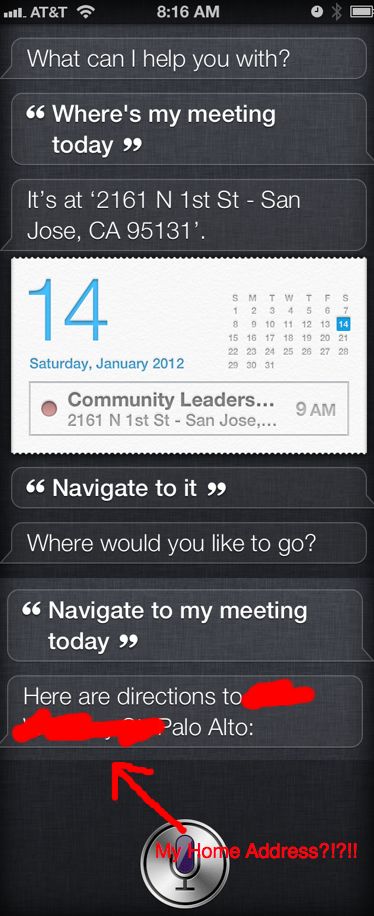
Back to everyday life, I'm hoping Siri can guide me to my meeting... 
...or not. I thought Siri stored a conversational context to help answer questions. Does Siri not remember my most recent questions? How do you get from this meeting to my own address? Or does she think I should skip out on my meeting and just go home?


Now where's that to-do list? 

ARGLE BARGLE!!!


I can already tell, this is going to be way more fun than autocorrect.